
Android dedicated device with device certificate and Microsoft NPS
I had a bit of trouble getting this to work with Android 11. When I searched around for information, more people seemed to have the same problem with Android 11/12 but no one had really found a solution. I hope this blog post can help others
Note: Tested on a Samsung A40 with Android 11
Create an user account in AD DS
Create an account with Full name ANDROID and User logon name ANDROID@yourdomain.com
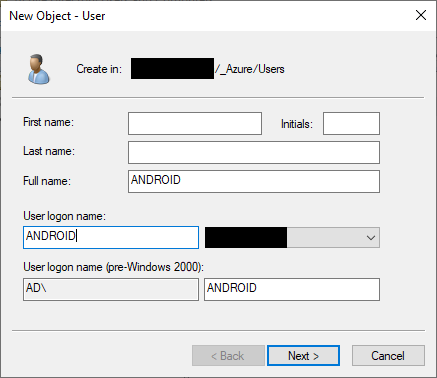
- Set a long complex password (at least 15 characters)
- Set that user cannot change password by selecting User cannot change password
- Set the password to not expire by selecting Password never expires
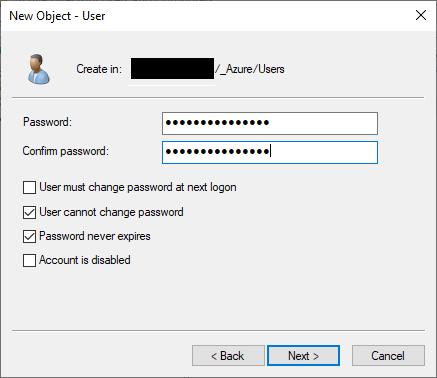
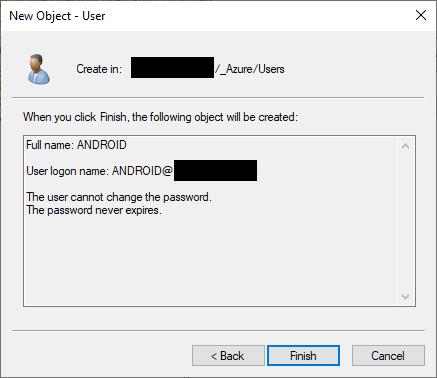
Click Finish to create the user account
Open the user account and in the user properties Account tab, select Smart Card is required for interactive logon and Account is sensitive and cannot be delegated
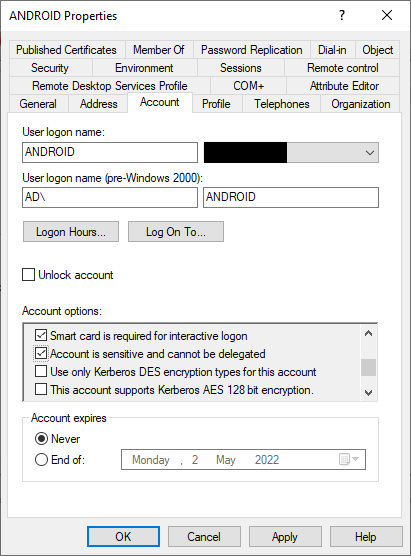
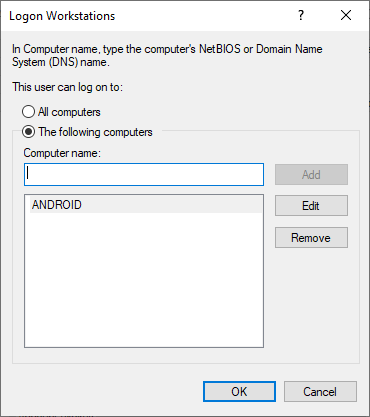
Still on the user properties Account tab, click on Logon On To… button and choice The following computers. Then enter a placeholder computer name (ANDROID for example). The placeholder computer account doesn’t need to exist in AD DS
Create a SCEP cerficate profile in MEM
Subject alternative name must have an attribute with User principal name (UPN) matching the created user account in AD DS. For example ANDROID@yourdomain.com

Create a Wi-Fi profile in MEM
Two settings are important for Android dedicated devices to connect to Wi-Fi. Server Trust – Radius server name and Identity privacy (outer identity). For more information, click on the i icon next to each setting
| Radius server name | For example your radius server(s) DNS suffix, yourdomain.com |
| Identity privacy (outer identity) | For example ANDROID (this must match User logon name of the created user account in AD DS) |
Note: These are settings that works with Microsoft NPS. If you use a NAC like Cisco ISE or Aruba ClearPass you can maybe get it to work with other settings

This is the information you will see if you click on the i icon next to the Identity privacy (outer identity) setting, “…This may be required if using device-based certificate authenication“
